

Description
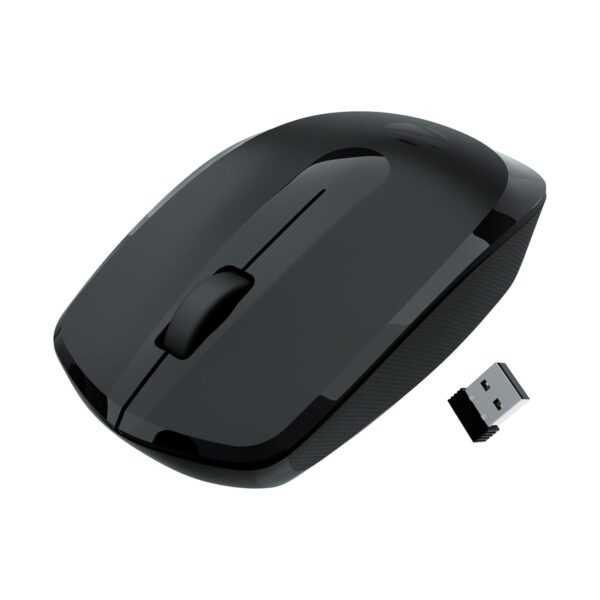
ZEBRONICS wireless mouse Freego (Black) is a straightforward 2.4 GHz mouse for everyday laptop or desktop use. The Amazon India listing for ASIN B0FF4XBM5N describes an optical mouse with left and right buttons, a middle scroll button, a USB nano receiver, a power-saving mode and a 3200 DPI setting. This guide helps you decide whether those features fit your setup. APICSTOCK has not independently tested this mouse.
Who is the ZEBRONICS wireless mouse Freego for?
It is worth considering if you want to remove a cable from a basic work or study desk and your computer has a suitable USB port for the receiver. A three-button layout covers browsing, documents, spreadsheets and general navigation. The compact receiver also makes it practical to carry with a laptop, provided you keep track of it when travelling.
It is less suitable if you specifically need Bluetooth pairing, switching among several devices, or a mouse designed for demanding gaming or precision creative work. The listing identifies a 2.4 GHz USB receiver; do not assume that it can connect over Bluetooth. If your laptop has only USB-C ports, check whether you already have a compatible adapter before ordering.
Buying checks before you order
- Confirm the exact variant. Select Freego in Black on the Amazon page and check that the offer is for the mouse you expect. Colour, seller and included accessories can differ between variants.
- Check the receiver and ports. The listing says a USB nano receiver is included. Verify that your computer has a compatible USB port. If the receiver is lost, ordinary Bluetooth pairing is not a substitute for this model.
- Think about sensitivity. The advertised 3200 DPI setting describes cursor sensitivity, not guaranteed accuracy on every desk or suitability for gaming. If you need a particular adjustable DPI range, confirm the current listing and user manual.
- Consider grip and surfaces. The seller describes an ergonomic shape and use on common desk surfaces. Comfort depends on your hand size and grip; optical tracking can vary by surface. A mouse pad is a sensible fallback on reflective or uneven desks.
- Verify the power setup. Do not assume a battery is included or rechargeable. Check the current listing’s box contents and battery requirements before checkout.
- Read recent reviews. Feedback on the Amazon listing is mixed, including reports concerning scrolling and reliability. Filter for the Black variant where possible and compare recent verified-purchase reviews rather than relying only on an overall rating.
What to check on delivery
Confirm the model and colour on the packaging, locate the USB nano receiver, and inspect the mouse for damage. Connect the receiver to a compatible computer, then test pointer movement, left and right clicks, and the scroll wheel on your usual work surface. If something does not work as expected, use the seller’s current Amazon return or support process; terms can change by offer.
APICSTOCK verdict
The ZEBRONICS wireless mouse Freego is a budget-oriented option for simple wireless navigation when a USB receiver is acceptable. Its practical appeal is the familiar three-button layout, not a promise of premium build quality. Because buyer feedback on the listing is mixed, compare the latest Black-variant reviews and current seller, return and warranty terms before deciding. For more options, browse the APICSTOCK shop.
Frequently asked questions
Does the ZEBRONICS wireless mouse use Bluetooth?
The referenced Freego listing specifies 2.4 GHz wireless operation using a USB nano receiver. Check a different model if you need direct Bluetooth pairing.
Will it work with a USB-C-only laptop?
The included receiver needs a compatible USB connection. A USB-C-only laptop may require an adapter; check your ports and adapter compatibility first.
Is the current price or stock guaranteed?
No. Amazon prices, availability, sellers and offers can change. Review the live product page at checkout.
Affiliate disclosure: APICSTOCK may earn from qualifying purchases made through the following Amazon India link, at no extra cost to you. Check the ZEBRONICS Freego Black offer on Amazon India.


